1- How to find quickly a lot of tips.
The
Built-In Micro-Help feature, that is included in all the
DecoTech™ programs, gives you a quick definition of all the graphical button commands
and their short-key when it exists.
To find specific information, use the search engine of the
Electronic User's Guide with the name of a button given by the
Built-In
Micro-Help, or the name of the window it opens, or any words written in a window.
These days it is uncommon to find a so well documented software with a lot of
examples and pictures. So do not hesitate and consult the
Electronic User's
Guide.
Finally read and do each of the Tutorials found in the
Electronic
User's Guide. They are there to show you quickly how to use the most common
features.
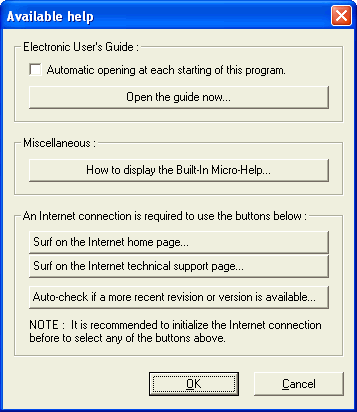
To open the How to display the Built-In Micro-Help window, click on the
White
Question Mark button located in the top right corner
(in the Animator program
it is located at the bottom right). Then locate the
Miscellaneous
control group and click on the button named
How to
display the Built-In Micro-Help.
To open the Electronic User's Guide,
click on the
White
Question Mark button located in the top right corner
(in the Animator program
it is located at the bottom right). Then locate and click on the
button named Open the guide now.

|