10- The installation is extremely slow under recent Windows™ XP version.
(Only apply to DecoTech
v5.xx, v6.00 and v6.01)
NOTE :
This trouble has been fixed in version 6.02.
During the installation of the DecoTech
software or additional objects library, the operating system becomes
extremely slow and the installation seems to take forever. This trouble
only happens when the operating system is a recent
Windows XP version. It does not happen on the first releases of
Windows XP as on other operating systems prior or after Windows XP.
There is the solution
to bypass this trouble :
When everything becomes extremely slow
(especially the refreshing of the display), hold down simultaneously
the Left Control key + Left Alternate key + Delete
key then release them and wait. A
few seconds later the Windows Task Manager dialog box
will open.
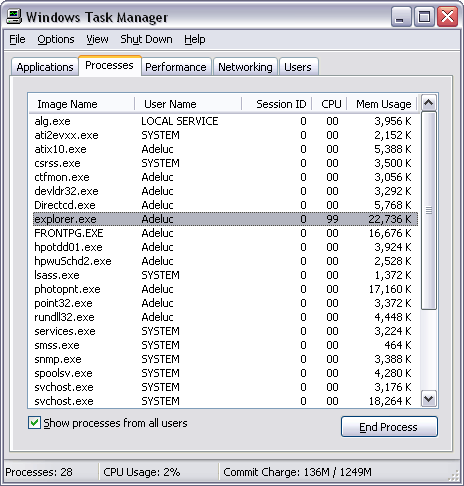
Select the Processes tablet
and wait until the display is refreshed.
Select the Image Name column to
sort alphabetically the processes and wait until the display is
refreshed.
Select the explorer.exe process
and terminate it by clicking the bottom right End Process
button.
(Notice the CPU usage in %. That is not leaving many CPU cycles
to other processes!)
Your task bar will disappear
as the desktop
but everything else will now run at the normal speed. Continue
the installation until it is completed. Bring back the
Windows Task Manager dialog box (see above). From
the File menu select New Task (Run...). Type explorer.exe
then click the OK button. Restart Windows XP as soon as
possible in order to reload all the applications that appear as small
icons in the task bar at right.

|
